Java has 8 simple data types: byte, short, int, long, char, float, double, and boolean.
These can be categorized in to four groups
Integers: byte(8 bit), short(16 bit), int(32 bit) and long(64 bit)
Floating point numbers: float(32 bit) and double(64 bit)
Characters: char( range is 0-255)
Boolean Values: boolean( either true or false)
Now let us take another example to get complete picture about variables.
As we have seen earlier simple variables stores single value. If we want to store multiple values of same type in single variable we can use arrays.
Structure
int arr[];
arr=new int[10];
Let us have a look at this one
As I told you earlier here arr is a variable of data type integer but in addition to that we have a new symbol [] which says that arr is a array variable. This is just declaration.
Earlier in one dimensional array we have declared our array as int arr[] but here we declared as int arr[][]. So one thing you might be cleared now is that if you want to create n dimensional array you have to keep n [] braces after your variable name.
Next part is defining array i.e. assigning length of array. Here we defined our array as new int[10][10]. It says that our array contains 10 rows each row containing 10 columns. If you don't get the idea just draw a table with 10 rows and 10 columns and that is your arr[10][10].
As you can guess control statements in java if and else conditions and switch and case statements.
Control statements generally decide which way way to go based on the given condition or rule. In any programming language control statements are inevitable.
Now lets start with if and else statements.
General structure of if and else statements
Loops are used to execute a particular block of code repeatedly.
General structure of while loop in java
while(condition){
body of loop
}
Here body of the loop executes until condition satisfies.
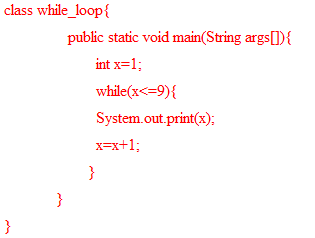
Let's take an example